
Brewing Success Online: How to Create a Cafe Website on WordPress
In the coffee industry, atmosphere and community are everything. While the rich aroma of freshly ground espresso and roasted beans draws people through your physical doors, a beautifully designed website is what connects you with new customers online, showcases your seasonal menu, and sells your coffee bags. WordPress is the perfect tool to build a digital hub for your cafe. Here is your step-by-step brewing guide.
Step 1: Select Your Beans (Domain & Premium Hosting)
Before crafting your design, you need a fast, reliable foundation so your website loads as quickly as a morning espresso shot.
-
Domain: Pick a name that matches your brand and includes your location if you are a local shop (e.g.,
www.artisanbeansla.comorwww.thecozycuppa.com). -
Hosting: High-quality imagery of latte art and cozy interiors requires speed. Opt for managed WordPress hosting utilizing NVMe SSDs paired with a free SSL certificate (for that secure HTTPS padlock).
Step 2: The Perfect Roast (Warm & Cozy Dark-Acre Themes)
Unlike pastel bakeries or corporate tech sites, modern cafes look best with earthy tones: rich browns, charcoal blacks, warm creams, and forest greens.
-
The Tools: Use Elementor or Gutenberg coupled with lightweight themes like Astra or GeneratePress. Look for "Cafe" or "Coffee Shop" starter templates that give you an immediate, moody, minimalist aesthetic which you can easily customize.
Step 3: Grind the Essentials (Website Structure)
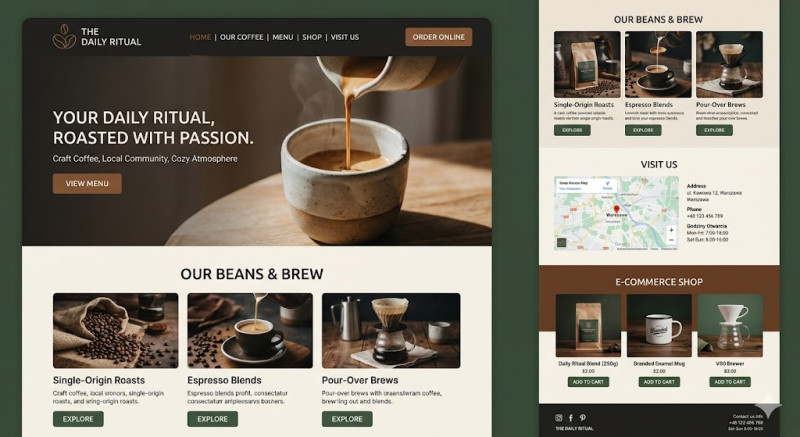
Keep your layout fluid and highly scannable. A great coffee shop website needs four main sections:
-
The Hero Section: A striking photo of a pouring espresso or a cozy view of your seating area. Use a punchy headline like "Your Daily Ritual, Roasted with Passion" paired with a "View Menu" button.
-
Live Coffee & Food Menu: Use a clean layout to separate your espresso drinks, pour-overs, teas, and local pastries. Clearly label your specialty options (e.g., oat milk alternatives, single-origin beans, or vegan treats).
-
The Roastery / E-Commerce Shop: If you roast your own beans, use WooCommerce to sell coffee bags, branded mugs, and brewing gear online with simple "Add to Cart" options.
-
Find Us (Crucial for Foot Traffic): Display your exact address, an embedded Google Map, and accurate opening hours.
Step 4: Essential Cafe Plugins
-
WPCafe or Food Menu: Excellent plugins for creating beautiful, responsive food and drink menus that look great on smartphones.
-
Smush: Automatically compresses your high-resolution shop images so your site loads instantly on mobile networks.
-
Pro-Tip: Pour on the Local SEO
Most of your customers will find you by searching "best specialty coffee near me" or "cafes with Wi-Fi in [City Name]". Ensure your city and neighborhood names are featured prominently in your headings. Hook up your site to a free Google My Business profile immediately to guarantee your spot on local maps when a coffee craving hits!