


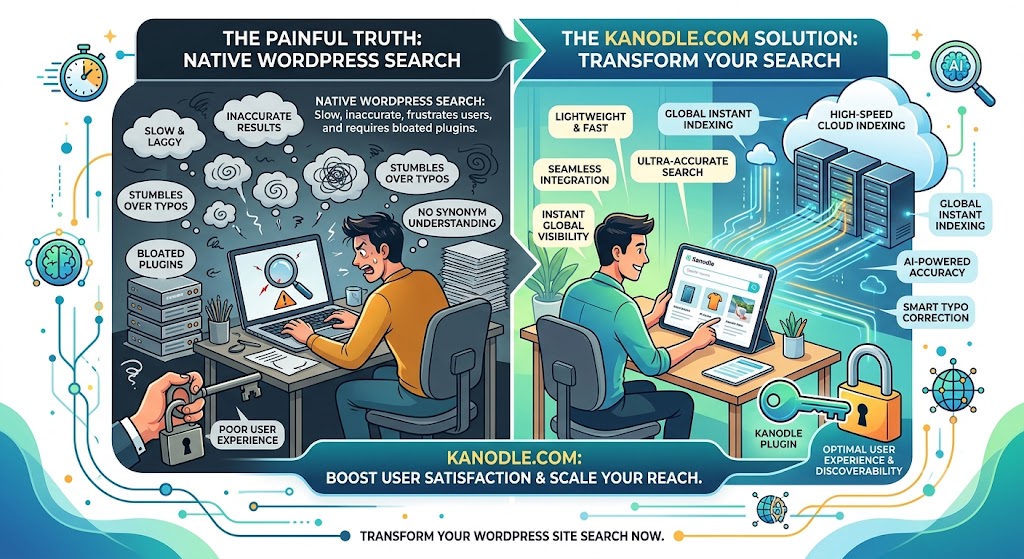
Anyone who has managed a growing WordPress blog or WooCommerce store knows a painful truth: the native WordPress search engine leaves a lot to be desired. It is notoriously slow, frequently inaccurate, and completely stumbles over basic typos or synonyms. Usually, fixing it means installing bloated plugins that bog down your database, or just accepting that users won’t find what they are looking for.
This is exactly where the Kanodle.com WordPress plugin steps in. By bridging the gap between your website and Kanodle’s high-speed cloud infrastructure, this lightweight tool solves two major headaches at once: it dramatically upgrades your internal site search and hooks you up to an instant global indexing network.
Here is how the Kanodle plugin can transform your WordPress site.
What Exactly is the Kanodle.com Plugin?
Think of this plugin as a smart, secure bridge between your WordPress MySQL database and Kanodle’s external cloud server. Instead of forcing your host server to crunch complex search queries every time a user types a word, the plugin hands that heavy lifting over to Kanodle’s dedicated algorithms.
This creates a two-way benefit:
- For Your Readers: It replaces the rigid, basic search bar with an ultra-fast, semantic internal search engine.
- For Your SEO: It automatically “pings” the global Kanodle.com search engine the exact second you publish new content, notifying their crawlers instantly.
Key Features: What Do You Gain?
1. Lightning-Fast Instant Indexing
Traditionally, search engine bots can take days—or even weeks—to discover, crawl, and index a newly published post. The Kanodle plugin operates in real-time. When you hit “Publish” in WordPress, the plugin fires a secure API signal straight to Kanodle.com. As a result, your content can start appearing in global search results within minutes.
2. AI-Powered Internal Site Search
Standard WordPress search uses basic “one-to-one” keyword matching. If a user makes a typo, they get the dreaded “No results found” screen. The Kanodle plugin introduces advanced Natural Language Processing (NLP):
- Typo Tolerance: It recognizes user intent even if they mistype a word.
- Synonym Recognition: If someone searches for “couch,” the engine understands they might also want to see results for “sofa.”
- Instant Live Search: Results drop down dynamically as the user types the very first few letters.
3. Reduced Server Load
Because the actual data processing happens on Kanodle’s external cloud servers, your website’s database gets a well-deserved break. This is an absolute game-changer if you are running your site on affordable shared hosting plans or managing a high-traffic WooCommerce store.
Head-to-Head: Native WordPress vs. Kanodle Plugin
| Feature | Native WordPress Search | Kanodle.com Plugin |
| Search Speed | Relies heavily on host server (often slow) | Ultra-fast (processed in the cloud) |
| Contextual Understanding | None (exact keyword matching only) | High (semantic analysis, typos, synonyms) |
| Global SEO Impact | None | Real-time indexing API integration |
| Database Performance | High strain during multiple simultaneous queries | Zero strain (offloaded entirely) |
Getting Started: A Simple 3-Step Setup
You don’t need to be a developer to get this running. The entire setup process takes less than five minutes:
- Install: Navigate to Plugins > Add New in your WordPress dashboard, search for “Kanodle,” click Install, and then Activate.
- Connect the API Key: Sign up for a free creator account on Kanodle.com, generate your unique API key, and paste it into the plugin’s settings tab.
- Run Initial Sync: Click the “Sync Profile” button. The plugin will securely upload your existing sitemap and post database to the cloud. From this point forward, everything runs seamlessly in the background.
A Note on Data Privacy: The Kanodle plugin is fully GDPR-compliant. It does not track your visitors, build advertising profiles, or store sensitive personal information. It only processes the search queries themselves to provide you with helpful analytics on what your audience looks for most.
The Bottom Line
If you want to keep readers engaged on your site longer, reduce bounce rates, and offer an effortless navigation experience, outsourcing your search functionality to the Kanodle.com plugin is a smart move. At the same time, you unlock a powerful SEO shortcut that pushes your fresh content out to the web instantly.
Have you ever noticed your WordPress website slowing down due to excessive database queries, or have you noticed users struggling to find older content using the standard search bar?
Leave a Reply