


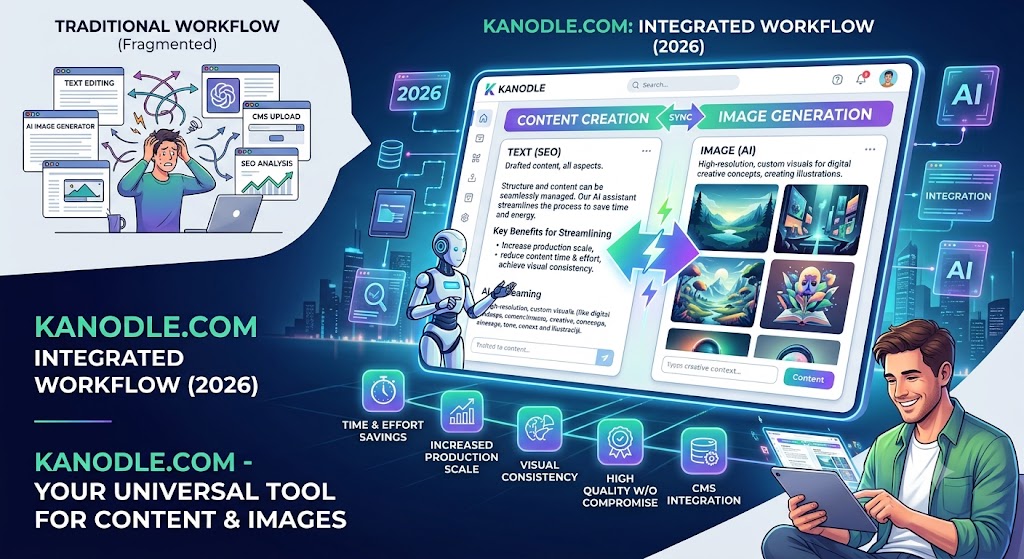
Let’s be honest: content creation is exhausting. Sourcing royalty-free images, drafting SEO-friendly copy, formatting paragraphs, and uploading everything to your CMS can turn a simple blog post into a multi-hour chore. Traditionally, creators have had to bounce between three or four different tabs—one for writing, one for AI art, and another for editing.
But the digital landscape is evolving rapidly in 2026. Kanodle.com—which initially made waves as an ultra-fast search engine and indexing tool—has expanded into a powerhouse AI content and image generation platform.
If you are looking to streamline your workflow and scale your website’s output without sacrificing quality, here is how Kanodle.com can become your ultimate creative sidekick.
What is Kanodle.com’s Content & Image Suite?
Kanodle.com offers a unified workspace where artificial intelligence handles both the keyboard and the canvas. Instead of using separate tools for text and design, Kanodle syncs the two processes.
When you generate an article, Kanodle’s engine analyzes the semantic meaning of your text and simultaneously renders custom, high-resolution visuals that match the exact tone, style, and context of your written content.
Key Features That Make Kanodle a Game-Changer
1. Semantic, SEO-First Text Generation
Kanodle doesn’t just churn out generic fluff. Its AI writer is trained on modern search patterns, meaning it structures articles with optimal heading hierarchies (H2, H3), bullet points, and natural keyword integration. The result is copy that reads like it was written by a human expert, tailored to rank on modern search engines.
2. Context-Aware Image Generation
Forget cheesy, overused stock photos that make your website look like a generic corporate template. Kanodle’s built-in image generator allows you to create custom visuals on the fly:
- Style Matching: Choose from photorealistic, flat vector illustration, minimal 3D render, or editorial style.
- Automatic Placement: The AI automatically places relevant images within the text where they make the most sense visually.
- Pre-optimized Files: Images are generated directly in lightweight WebP formats with automated, SEO-friendly Alt text based on the article’s context.
3. One-Click CMS Export
Because Kanodle has a native WordPress and WooCommerce integration, you don’t have to copy-paste or download/upload files manually. Once you approve the generated draft and its accompanying graphics, you can publish them directly to your live site with a single click.
How to Generate a Complete Article with Images on Kanodle
Generating publication-ready content on Kanodle is incredibly simple. Here is a quick step-by-step breakdown:
- Input Your Brief: Type in your target topic, primary keywords, and desired word count (e.g., “A 1,200-word guide on organic gardening for beginners”).
- Define Your Visual Style: Select the aesthetic of your images. For a friendly blog, you might choose “Warm Vector Illustration.” For a tech site, “Futuristic 3D Render” might fit best.
- Generate & Review: Let the AI build the layout. Within a minute, you’ll have a fully formatted article complete with perfectly placed, high-quality images.
- Edit and Fine-Tune: Use the interactive canvas editor to tweak the copy or ask the AI to “regenerate this specific image with a darker color palette.”
- Publish: Hit the export button to send it straight to your WordPress dashboard as a formatted draft.
Traditional Workflow vs. The Kanodle.com Way
| Feature | The Old Way (Multi-Tool) | The Kanodle.com Way |
| Tools Required | ChatGPT + Midjourney + Canva + WordPress | Kanodle.com + WordPress Plugin |
| Average Time Spent | 2 to 3 hours per post | 10 to 15 minutes per post |
| Image SEO | Manual resizing, compression, and Alt-tagging | Automated WebP conversion and Alt-text generation |
| Visual Cohesion | High risk of mismatched stock/AI styles | Guaranteed visual consistency across the post |
Best Practices for Maximizing Your Results
While Kanodle’s AI is incredibly powerful, the secret to outstanding content lies in hybrid creation. To stand out in 2026, use these three tips to elevate your generated posts:
The 80/20 Rule: Let Kanodle do 80% of the heavy lifting (structuring, drafting, and generating graphics). Spend the remaining 20% adding your unique brand voice, personal anecdotes, or specific product links to make the content truly yours.
- Be Specific in Your Prompt: Instead of “write about coffee,” try “write a guide comparing light roast vs. dark roast coffee for espresso lovers, with a cozy, rustic visual style.”
- Keep Your Brand Styles Consistent: Once you find an image style that matches your website’s theme, save it in your Kanodle brand profile so all future generated images look cohesive.
Conclusion: Scale Smashes Bottlenecks
In the competitive world of digital publishing, speed and quality are everything. Kanodle.com effectively smashes the creative bottleneck by unifying writing and graphic design into a seamless, automated workflow. By leveraging this tool, you can scale your content output, keep your website visually stunning, and save hours of administrative headache every single week.
What is the biggest bottleneck in your current website workflow—is it drafting high-quality copy, or is it finding and formatting the perfect images?
Leave a Reply